GEO4X coupon code searches usually come from teams trying to cut SaaS spend on a cloud geospatial viewer. As of March 2026, I couldn’t confirm a public, always-available code promoted on GEO4X’s official pricing or terms pages, so this page focuses on legit savings you can actually repeat.
You’ll see how annual billing works, when to stay on Pro versus ask about Enterprise, and how to avoid paying for storage and processing you don’t need. If you received a private promo from a partner or campaign, I’ll show a safe apply-and-verify flow plus a quick checklist for failed codes.
-
Reviews
-
Last Used
-
Date Ends
-
Type
-
country
-
Date Added
As of March 2026, I couldn’t verify a public GEO4X coupon code that reliably applies at checkout on the official GEO4X site. Instead of chasing unverified “codes,” this page shows the repeatable ways teams typically save on a geospatial SaaS platform: choosing the right plan, paying annually when you’re sure, and avoiding storage or processing spend you won’t use.
Drone pilots delivering orthomosaics to clients.
Survey teams tracking volumes and surfaces.
Construction PMs documenting progress in 3D. Your checkout may differ. This isn’t magic… pricing + policy. Micro-check #1: the pricing section shows a “Per year (-16%)” toggle and lists Pro at 54.99€/month (excl. tax) with 100GB storage. Micro-check #2: the terms state photogrammetry processing requires upgrading to Pro, triggers a 15-day free trial, then renews monthly unless cancelled from the account area before the term; any started period remains due. If you want to see the current official path in one click, start here: visit GEO4X via the tracked deal route.
GEO4X coupon code status
Here’s the boring truth, straight from official pages: GEO4X markets itself through transparent plan pricing and a “try for free” flow, not a constant stream of public coupon codes. Start from official buttons, not coupon aggregators, because link-based offers and plan toggles are the only discounts you can reliably validate on your own billing screen.
If you do receive a private discount (partner, event, procurement negotiation), treat it like a contract: confirm it changes the total before you approve payment, and save the invoice/receipt for later. If it’s not in writing, assume it’s not included.
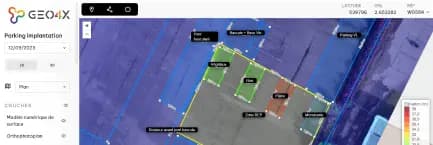
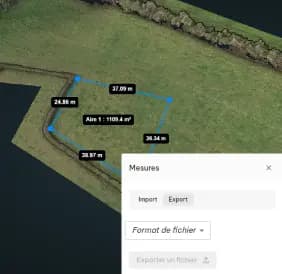
Best for: teams that need a cloud viewer to share 2D/3D georeferenced data (orthomosaics, DEMs, point clouds) with clients or internal stakeholders, plus measurement and export tools.
Not ideal for: projects that require certified surveying deliverables, or teams that want an offline-only desktop workflow with zero cloud sharing.
Check with a professional first if: you’re using outputs for regulatory, legal boundary, or certified topographic purposes—use the platform for analysis and collaboration, then validate any official requirements with qualified professionals.
To understand what GEO4X is designed for—especially viewing and delivering photogrammetry outputs online—this official video overview is a helpful baseline before you commit budget.

Policy beats vibes when billing is involved, so the safe strategy is simple: verify plan scope, trial behavior, and cancellation rules before you scale usage. Make the map earn the subscription cost.
Best ways to save (no-code)
When a public coupon isn’t clearly posted, savings come from operating the tool efficiently. No magic—just math and totals that match. The best “discount” is often preventing waste: paying for storage you don’t need yet, ordering processing you could postpone, or upgrading before your workflow is stable.
Rule of thumb: stay monthly until GEO4X saves you at least one site visit.
- Use the annual toggle only when you’re committed: the public pricing section shows an annual option that reduces the effective monthly cost compared with paying month-to-month.
- Right-size storage from day one: keep only active projects “hot,” archive old datasets off-platform if your workflow allows, and avoid treating cloud storage like an infinite dumping ground.
- Invite collaborators instead of exporting everything: sharing a live project link is often cheaper (and faster) than producing endless duplicate exports for every stakeholder.
- Batch uploads and clean inputs: smaller, well-organized uploads reduce time spent reprocessing or re-uploading, which is the hidden cost people forget.
- Separate “viewer” needs from “processing” needs: GEO4X also offers photogrammetry processing as an option; don’t pay for processing unless you truly need that service for a deliverable.
Measure first, then upgrade.
If you’re shopping this tool for a team, agree on one success metric before upgrading—faster stakeholder sign-off, fewer site visits, or less time stitching reports. That keeps plan decisions grounded in outcomes rather than feature-checklist anxiety.
Want the quickest way to see what pricing looks like for your region and tax setup? Use the tracked route and compare totals with your real usage needs: open GEO4X pricing.
How to apply a promo (steps)
Some discounts are code-based, others are link-based, and some are simply negotiated for Enterprise. Start from official buttons, not a copied cart link from a random forum. If the checkout template changes, this may change.
- Create an account in the GEO4X app and confirm you can access a project workspace.
- Choose your plan (or request Enterprise) based on storage, sharing permissions, and the support level your team needs.
- Proceed through the official upgrade flow from your account area.
- If a promo or discount field is presented, enter the code exactly as provided and apply it.
- Confirm the invoice or order summary reflects the expected total before approving payment.
- Save the receipt and note the renewal date, so you can re-evaluate with real usage data before the next term.
Keep storage costs honest.
Code fail checklist
When a code fails, it’s usually a rules mismatch rather than a technical bug. Screenshots lie; totals don’t in checkout today. Run this list once, then move on to the no-code savings that always work.
- Wrong scope: the promo may apply only to a specific plan, billing interval, or Enterprise quote.
- Wrong starting page: some discounts require a dedicated campaign link and won’t apply if you start from the generic pricing page.
- Eligibility limits: partner or event promos can be restricted to new accounts or specific email domains.
- Expired or capped redemptions: many promos end quietly while coupon sites keep listing them.
- Stacking blocked: you may not be able to combine an annual discount with an additional coupon.
- Formatting issues: watch capitalization and whitespace; re-type the code if copy/paste adds hidden characters.
If you’re still stuck, the fastest path is to contact GEO4X support with the code (or campaign link), the plan you selected, and the total you’re seeing. Workflows save more than coupons ever do.
Pricing/bundles + refund/trial reality check
GEO4X’s public pricing is straightforward: a self-serve Pro plan and an Enterprise option with custom pricing. Pro is positioned as the default plan for most teams, with a published monthly price (exclusive of tax) and an annual billing option shown on the pricing section. Enterprise is for organizations that need more storage, platform customization, custom features, and a dedicated account manager, which is why it typically runs through a sales conversation rather than a one-click checkout.
I first assumed “try for free” meant a generic, no-strings trial, then realized the terms tie a 15-day free trial to activating Pro in the context of ordering photogrammetry processing, followed by monthly tacit renewal unless you cancel before the term. That’s not unusual for SaaS; it just means you should set a calendar reminder and make a decision with eyes open.
On cancellation and refunds, the terms emphasize a professional (B2B) audience, describe automatic payment authorization, and state that any started period remains due. Cancellation is initiated from the account area and becomes effective at the end of the current billing period. For consumers (where applicable), a limited withdrawal right is described, with restrictions if services have already begun. The practical takeaway is simple: treat plan selection as an operations decision, not an impulse purchase.
Also keep expectations realistic about deliverables: GEO4X describes a best-efforts approach, and notes that photogrammetry outputs depend heavily on the quality of your input data. If you need legally certified surveying outputs, you’ll still need the right licensed professionals for that work.
Seasonality
Coupon seasonality is weaker in B2B geospatial software than it is in consumer apps. The times you’re most likely to see pricing changes or promotions are budget cycles (end-of-quarter, end-of-year), industry events, and product updates that come with new plan positioning. Start from official announcements and pricing pages, because third-party coupon claims can lag reality by months.
A smarter “seasonality” play is operational: if you can plan ahead, run a small pilot first, document time saved on real projects, then negotiate or choose annual billing once you have proof the workflow is sticking. Treat renewals like a checklist, always—not a surprise.
Alternatives
If GEO4X isn’t the right fit, compare alternatives based on what you actually need: cloud viewing and sharing, photogrammetry processing, collaboration permissions, and export formats. Avoid tool-hoarding; one platform that your stakeholders actually use beats three that live in bookmarks.
- DroneDeploy: a widely used platform for drone mapping, inspections, and sharing deliverables.
- Pix4Dcloud: cloud sharing and collaboration for photogrammetry outputs, often paired with Pix4D processing tools.
- Propeller Aero: popular for construction and earthworks volume tracking workflows.
- Trimble Stratus: construction-focused site documentation and earthworks measurement tooling.
- Cesium ion + CesiumJS stack: for teams building custom 3D web viewers with engineering resources.
Choose the tool that matches your team’s cadence: how often you upload, how often clients need access, and how quickly decisions must be made from the data.
FAQs + operator notes
Q: Is there a verified GEO4X coupon code right now?
A: As of March 2026, I couldn’t verify a public, always-available code promoted on GEO4X’s official pricing or terms pages. If you receive a private promo (partner/event/quote), apply it through the official upgrade flow and confirm the invoice total changes before paying.
Q: What’s the safest way to save without a code?
A: Use the annual billing option only after a pilot proves the workflow, keep storage tidy (archive old projects when appropriate), and avoid paying for processing services you don’t need for your current deliverables.
Q: Does GEO4X have a free trial?
A: The site promotes a “try for free” path, and the terms describe a 15-day free trial tied to activating Pro when ordering photogrammetry processing, followed by monthly renewal unless cancelled before the term.
Q: How do I cancel a subscription?
A: The terms state cancellation can be initiated from your account area and takes effect at the end of the current billing period. Set a calendar reminder before renewal so you can decide with real usage data.
Q: What files can I use in GEO4X?
A: GEO4X positions itself as a viewer for common geospatial deliverables such as orthomosaics, digital elevation models, point clouds, and related project files. Check your specific formats and project requirements before uploading production data.
Q: Is GEO4X photogrammetry processing “guaranteed”?
A: The terms describe a best-efforts obligation and note that output quality depends on the quality and completeness of your input data. If your deliverable requires certified or regulatory surveying accuracy, validate those needs with qualified professionals.
Operator notes: Last checked: March 2026. I verified the official pricing page for plan structure and the annual billing toggle, and reviewed the official terms for trial/renewal and cancellation language. I did not verify any public coupon string or guaranteed percentage discount, because no universal code was published on the official site at the time of review.
