Chaport coupon code searches are usually about lowering the cost of live chat without compromising reliability. As of March 2026, I couldn’t confirm a public, always-available coupon published on Chaport’s official pricing or help pages, so this page focuses on savings you can actually repeat.
You’ll see the safest no-code options (the free plan, the 14-day Unlimited trial, and the annual-billing discount), how to apply a private promo if you receive one, and what to check around VAT and refunds before you subscribe. The goal: a lower checkout total today and fewer billing surprises later.
-
Reviews
-
Last Used
-
Date Ends
-
Type
-
country
-
Date Added
Here’s the boring truth. As of March 2026, I couldn’t verify a public Chaport coupon code that’s reliably available to everyone; the official site leans on plan pricing, a free trial, and annual billing savings instead of a permanent “enter code, get X%” promo.
Solo founder: a widget that works, plus a bill you can explain.
Support team: faster routing and fewer missed chats.
Agency: multi-site installs without a tool pile-up. Your checkout may differ depending on your country, VAT rules, and payment method. This isn’t magic… pricing + policy. Micro-check #1: Chaport’s help center says card/PayPal payments are processed by Paddle (UK). Micro-check #2: Chaport’s pricing page highlights a 25% discount when you choose annual billing.
Chaport coupon code status
Start from official buttons. If you’re seeing “65% off” style claims on coupon aggregators, treat them as unverified until your checkout total actually changes on Chaport’s own billing screen. Codes can exist, but they’re typically link-based promos, partner perks, or time-boxed campaigns—not something I can responsibly promise without an official announcement.
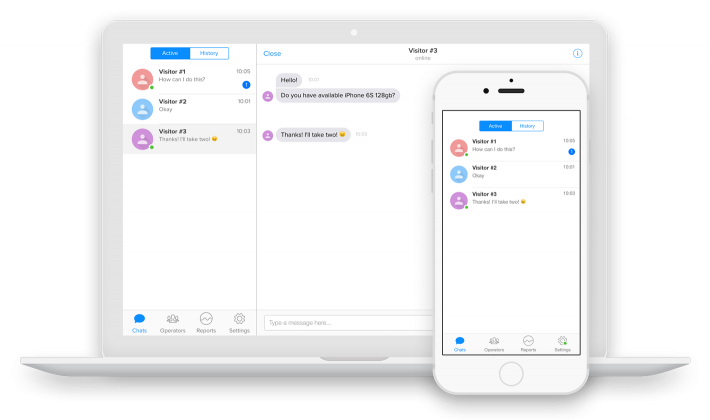
Best for: teams that want a clean live chat widget plus chatbots and multi-channel inbox in one place, without per-agent pricing surprises.
Not ideal for: businesses that need enterprise-grade SLAs, heavy CRM customization, or a deeply bespoke support stack from day one.
Check with a professional first if: you operate in a regulated industry and need guidance on data retention, consent, or customer communication policies.
If you want to see what Chaport is offering right now (trial, annual pricing, and any official promos), use this tracked path: Chaport deals and plans.
One more pragmatic note: Chaport offers a free plan, so the “best deal” can literally be paying $0 until you prove the workflow is worth upgrading. That’s a better risk profile than chasing a questionable coupon string.
Best ways to save (no-code)
No magic—just math, plus a quick policy read. When coupons aren’t clearly published, your savings come from choosing the right tier and avoiding waste (extra seats, unused automation, or paying annually before you’re sure).
- Use the 14-day Unlimited trial: test chatbots, knowledge base + FAQ bot, assignment rules, and the full workflow before spending anything.
- Let the account downgrade do its job: after the trial, Chaport automatically downgrades you to the Free plan, which is useful if you only needed a short evaluation window.
- Switch to annual only after you have signal: annual billing is discounted, but it’s smartest once you’ve confirmed adoption and operator coverage.
- Right-size by operator count: if your team will stay within Pro’s included operators, you may not need Unlimited yet.
- Don’t overbuy automation: if you won’t launch chatbots or a knowledge base this month, keep the plan simple and upgrade when you’re ready.
- Trim “missed chat” costs first: improving coverage hours and routing often beats saving a small amount on subscription price.
Rule of thumb: if you won’t staff more than four operators this quarter, start on Pro and only upgrade when you have a clear reason (chatbots/teams/assignment rules) to justify Unlimited.
If you’re shopping with a team, decide on one success metric before you upgrade: fewer missed chats, faster first response, or more qualified leads. Choosing one clean metric beats five conflicting opinions.
How to apply a promo (steps)
Private codes happen, but they’re only real if the total changes. If the checkout template changes, this may change.
- Create a Chaport account and open your dashboard.
- Go to Settings → Billing and choose Proceed to payment (this is the official upgrade flow in the help center).
- Select the plan (Pro or Unlimited) and choose monthly vs annual billing.
- If you received a promo code, paste it into the discount/coupon field and apply it.
- Confirm the order summary reflects the new total before you complete payment.
If the promo is delivered as a special landing link instead of a code field, start from that link in a fresh session and avoid switching tabs mid-checkout. That tiny habit prevents a lot of “why didn’t my discount stick?” frustration.
For a quick overview of what Chaport is and how the platform is positioned, this official video is a useful orientation before you commit to a paid plan:
Code fail checklist
When a code fails, assume rules—not glitches. Screenshots lie when they hide the total, so verify everything on the final order summary.
- Wrong plan scope: some promos apply only to Pro or only to Unlimited.
- Wrong billing cycle: a code may work on monthly but not annual (or the reverse).
- Account eligibility: new-customer, partner, or event codes can be account-specific.
- Expired or capped redemptions: campaigns end, and coupon pages rarely update fast.
- Stacking blocked: you may not be able to combine a code with an annual discount.
- Formatting errors: extra spaces and capitalization mismatches can break codes.
- Tax/VAT confusion: your subtotal can change while VAT is added on top, making the “discount” feel smaller.
If you still can’t apply it, contact Chaport support with the code, the plan you chose, and a screenshot of the order summary total you’re seeing. Pay for measurable usage, not pure hope.
Pricing/bundles + refund/trial reality check
Chaport pricing is intentionally simple: Free, Pro, and Unlimited. The Free plan includes unlimited chats and websites with a limited chat history window, while Pro and Unlimited add deeper reporting, integrations, automation, and advanced management features (with Unlimited unlocking chatbots, knowledge base + FAQ bot, teams, assignment rules, and more). The official pricing page also lists plan prices with monthly vs annual billing, and you should expect VAT/sales tax to be added depending on your location and whether you have a VAT/tax number.
I first assumed Chaport billed per agent, then realized the official pricing is tier-based with included operator counts (and Unlimited removes the operator cap), which can be a big deal for growing support teams.
Now the part most people skip: refunds. Chaport’s Terms include a refund policy stating they provide no refunds or credits for unused time or plan downgrades, with no exceptions. That’s not unusual for SaaS, but it changes the correct buying behavior: you use the trial to validate fit, you set a renewal reminder, and you upgrade only when the workflow is proven.
Set the renewal reminder now, not later. If you’re buying for a team, assign one owner for billing and one owner for chat operations, so you don’t end up paying for a tool nobody is maintaining.
Seasonality
Customer support tools do run promotions, but not on a predictable calendar. The pattern you can rely on is this: official pricing pages, official emails, and official partner programs are where legitimate discounts show up. Third-party coupon lists often mix old campaigns with guesses, which is why the only “verification” that matters is your live checkout total.
If you can wait, check around high-attention periods (end-of-year budgeting, product launches, and major sales seasons) and watch for an official landing page or announcement. If you can’t wait, don’t freeze your support stack for a hypothetical coupon; use the free plan or trial, then upgrade once your team is responding consistently and you can quantify the ROI.
Alternatives
If Chaport isn’t the right fit, compare tools based on your real constraint: do you need a free widget, deep automation, a full omnichannel helpdesk, or enterprise reporting? Avoid discount rabbit holes and pick what your team will actually use.
- tawk.to: popular free live chat option for basic website chat coverage.
- Crisp: a modern shared inbox approach with live chat and engagement features.
- Intercom: stronger for product-led messaging and automation, typically at a higher price point.
- LiveChat: established live chat product with robust agent tooling.
- Zendesk Messaging/Chat: useful if you already run Zendesk and want tight helpdesk integration.
Before you switch, write down your non-negotiables: operator count, chatbot needs, integrations, and the minimum reporting you require. Then pick the product that hits those needs with the least operational drag.
FAQs + operator notes
Q: Is there a verified Chaport coupon code right now?
A: As of March 2026, I couldn’t confirm a public, always-available coupon code published by Chaport. If you receive a private code from an official email, partner, or campaign page, apply it in billing and verify the order summary total changes before paying.
Q: What’s the safest way to pay less without a code?
A: Use the 14-day Unlimited trial to validate fit, then choose the smallest plan that matches your operator count and feature needs. If you’re confident you’ll keep the tool long term, annual billing can lower the effective monthly cost.
Q: Do I need a credit card for the trial?
A: Chaport’s pricing page states the 14-day trial is available without requiring a credit card, and after the trial the account is downgraded to the Free plan automatically.
Q: What payment methods does Chaport accept?
A: Chaport’s help center lists PayPal, Visa, and MasterCard, and notes that payments are processed by Paddle (UK).
Q: Can I get a refund if I cancel mid-cycle?
A: Chaport’s Terms include a refund policy stating there are no refunds or credits for unused subscription time or plan downgrades, so plan purchases like a commitment and use the trial to test first.
Q: How do I upgrade (or downgrade) my plan?
A: The official help center describes upgrading from your account via Settings → Billing, then choosing a plan and billing period. Downgrades typically mean features are disabled, so export anything important before changing tiers.
Q: Why do coupon codes from deal sites fail?
A: Most failures are scope and eligibility issues: the code is expired, tied to a specific plan, tied to a campaign link, or blocked from stacking with annual pricing. The only reliable signal is whether your checkout total changes.
Operator notes: Last checked: March 2026, and I verified on Chaport’s official pricing page: plan tiers (Free/Pro/Unlimited), the 14-day Unlimited trial with automatic downgrade to Free afterward, and the stated annual-billing discount. Verified on Chaport’s official help center: accepted payment methods and that Paddle (UK) handles payment processing, plus the upgrade path via Settings → Billing. Verified on Chaport’s Terms: refund policy language indicating no refunds/credits for unused time or downgrades. Not verified: any currently active public coupon code, because none was published as universally available on the official site at time of review.
